
How to Manage Values / Convert Values to a Good Script
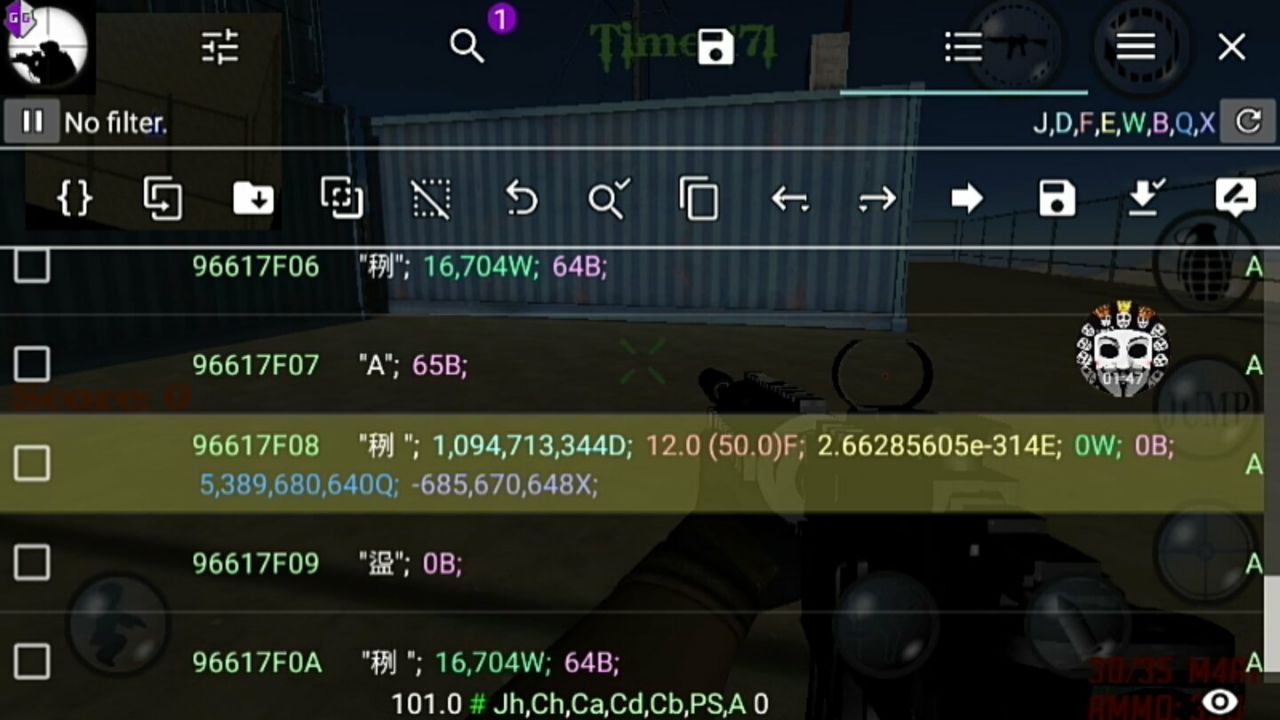
Example Details
Description
I found a value in game which is 12 Float, and that is speed run value. Now I want to convert it into a well-managed script. Tap value, then tap go to, and take some screenshots. Done.
From screenshot, I saw this pattern:
64B -- Value upside of speed run
65B -- Value upside of speed run
12F -- Speed run value
64B -- Value below speed run value
Here B means Byte and F means Float. Our main value is 12 Float. This is in ordered manner, so we combine them:
64B;65B;12F;64B
Now we tell Game Guardian that these values are assembled in ordered way:
64B;65B;12F;64B::
Next we tell GG the distance between values:
64B;65B;12F;64B::5
The values were near, so I guessed 5. If it does not work, make it higher like 10, 20, or more.
Script Breakdown
gg.clearResults() -- clear all existing results

gg.setRanges(gg.REGION_ANONYMOUS) -- search only in Anonymous range

gg.searchNumber("64B;65B;12;64B::5", gg.TYPE_FLOAT) -- search assembled pattern

gg.refineNumber(12, gg.TYPE_FLOAT) -- keep only value 12

gg.getResults(100) -- get first 100 results only

gg.editAll(80, gg.TYPE_FLOAT) -- edit selected values to 80

gg.clearResults() -- clear results again

gg.toast("SPEED RUN ACTIVE ") -- show activation message
Final Script
gg.clearResults()
gg.setRanges(gg.REGION_ANONYMOUS)
gg.searchNumber("64B;65B;12;64B::5", gg.TYPE_FLOAT)
gg.refineNumber(12, gg.TYPE_FLOAT)
gg.getResults(100)
gg.editAll(80, gg.TYPE_FLOAT)
gg.clearResults()
gg.toast("SPEED RUN ACTIVE ")
Things to Remember
- Use go-to screenshots to build stable ordered value patterns.
- Use `::distance` and adjust distance if first guess fails.
- Edit only limited results (like first 100) to reduce crash risk.
- Refine by main value type and value before editing all.
This is a real value pattern you can try in game.
Next video is on bullet rain value finding.